Specialized shape representing a convex polygon. More...
#include <D:/private/SFML/SFML/include/SFML/Graphics/ConvexShape.hpp>
Public Member Functions | |
| ConvexShape (std::size_t pointCount=0) | |
| Default constructor. | |
| void | setPointCount (std::size_t count) |
| Set the number of points of the polygon. | |
| std::size_t | getPointCount () const override |
| Get the number of points of the polygon. | |
| void | setPoint (std::size_t index, Vector2f point) |
| Set the position of a point. | |
| Vector2f | getPoint (std::size_t index) const override |
| Get the position of a point. | |
| void | setTexture (const Texture *texture, bool resetRect=false) |
| Change the source texture of the shape. | |
| void | setTextureRect (const IntRect &rect) |
| Set the sub-rectangle of the texture that the shape will display. | |
| void | setFillColor (Color color) |
| Set the fill color of the shape. | |
| void | setOutlineColor (Color color) |
| Set the outline color of the shape. | |
| void | setOutlineThickness (float thickness) |
| Set the thickness of the shape's outline. | |
| void | setMiterLimit (float miterLimit) |
| Set the limit on the ratio between miter length and outline thickness. | |
| const Texture * | getTexture () const |
| Get the source texture of the shape. | |
| const IntRect & | getTextureRect () const |
| Get the sub-rectangle of the texture displayed by the shape. | |
| Color | getFillColor () const |
| Get the fill color of the shape. | |
| Color | getOutlineColor () const |
| Get the outline color of the shape. | |
| float | getOutlineThickness () const |
| Get the outline thickness of the shape. | |
| float | getMiterLimit () const |
| Get the limit on the ratio between miter length and outline thickness. | |
| virtual Vector2f | getGeometricCenter () const |
| Get the geometric center of the shape. | |
| FloatRect | getLocalBounds () const |
| Get the local bounding rectangle of the entity. | |
| FloatRect | getGlobalBounds () const |
| Get the global (non-minimal) bounding rectangle of the entity. | |
| void | setPosition (Vector2f position) |
| set the position of the object | |
| void | setRotation (Angle angle) |
| set the orientation of the object | |
| void | setScale (Vector2f factors) |
| set the scale factors of the object | |
| void | setOrigin (Vector2f origin) |
| set the local origin of the object | |
| Vector2f | getPosition () const |
| get the position of the object | |
| Angle | getRotation () const |
| get the orientation of the object | |
| Vector2f | getScale () const |
| get the current scale of the object | |
| Vector2f | getOrigin () const |
| get the local origin of the object | |
| void | move (Vector2f offset) |
| Move the object by a given offset. | |
| void | rotate (Angle angle) |
| Rotate the object. | |
| void | scale (Vector2f factor) |
| Scale the object. | |
| const Transform & | getTransform () const |
| get the combined transform of the object | |
| const Transform & | getInverseTransform () const |
| get the inverse of the combined transform of the object | |
Protected Member Functions | |
| void | update () |
| Recompute the internal geometry of the shape. | |
Detailed Description
Specialized shape representing a convex polygon.
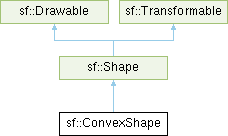
This class inherits all the functions of sf::Transformable (position, rotation, scale, bounds, ...) as well as the functions of sf::Shape (outline, color, texture, ...).
It is important to keep in mind that a convex shape must always be... convex, otherwise it may not be drawn correctly. Moreover, the points must be defined in order; using a random order would result in an incorrect shape.
Usage example:
- See also
- sf::Shape, sf::RectangleShape, sf::CircleShape
Definition at line 45 of file ConvexShape.hpp.
Constructor & Destructor Documentation
◆ ConvexShape()
|
explicit |
Default constructor.
- Parameters
-
pointCount Number of points of the polygon
Member Function Documentation
◆ getFillColor()
|
nodiscardinherited |
◆ getGeometricCenter()
|
nodiscardvirtualinherited |
Get the geometric center of the shape.
The returned point is in local coordinates, that is, the shape's transforms (position, rotation, scale) are not taken into account.
- Returns
- The geometric center of the shape
Reimplemented in sf::CircleShape, and sf::RectangleShape.
◆ getGlobalBounds()
|
nodiscardinherited |
Get the global (non-minimal) bounding rectangle of the entity.
The returned rectangle is in global coordinates, which means that it takes into account the transformations (translation, rotation, scale, ...) that are applied to the entity. In other words, this function returns the bounds of the shape in the global 2D world's coordinate system.
This function does not necessarily return the minimal bounding rectangle. It merely ensures that the returned rectangle covers all the vertices (but possibly more). This allows for a fast approximation of the bounds as a first check; you may want to use more precise checks on top of that.
- Returns
- Global bounding rectangle of the entity
◆ getInverseTransform()
|
nodiscardinherited |
get the inverse of the combined transform of the object
- Returns
- Inverse of the combined transformations applied to the object
- See also
- getTransform
◆ getLocalBounds()
|
nodiscardinherited |
Get the local bounding rectangle of the entity.
The returned rectangle is in local coordinates, which means that it ignores the transformations (translation, rotation, scale, ...) that are applied to the entity. In other words, this function returns the bounds of the entity in the entity's coordinate system.
- Returns
- Local bounding rectangle of the entity
◆ getMiterLimit()
|
nodiscardinherited |
Get the limit on the ratio between miter length and outline thickness.
- Returns
- Limit on the ratio between miter length and outline thickness
- See also
- setMiterLimit
◆ getOrigin()
|
nodiscardinherited |
◆ getOutlineColor()
|
nodiscardinherited |
◆ getOutlineThickness()
|
nodiscardinherited |
Get the outline thickness of the shape.
- Returns
- Outline thickness of the shape
- See also
- setOutlineThickness
◆ getPoint()
|
nodiscardoverridevirtual |
Get the position of a point.
The returned point is in local coordinates, that is, the shape's transforms (position, rotation, scale) are not taken into account. The result is undefined if index is out of the valid range.
- Parameters
-
index Index of the point to get, in range [0 .. getPointCount() - 1]
- Returns
- Position of the index-th point of the polygon
- See also
- setPoint
Implements sf::Shape.
◆ getPointCount()
|
nodiscardoverridevirtual |
Get the number of points of the polygon.
- Returns
- Number of points of the polygon
- See also
- setPointCount
Implements sf::Shape.
◆ getPosition()
|
nodiscardinherited |
◆ getRotation()
|
nodiscardinherited |
get the orientation of the object
The rotation is always in the range [0, 360].
- Returns
- Current rotation
- See also
- setRotation
◆ getScale()
|
nodiscardinherited |
◆ getTexture()
|
nodiscardinherited |
Get the source texture of the shape.
If the shape has no source texture, a nullptr is returned. The returned pointer is const, which means that you can't modify the texture when you retrieve it with this function.
- Returns
- Pointer to the shape's texture
- See also
- setTexture
◆ getTextureRect()
|
nodiscardinherited |
Get the sub-rectangle of the texture displayed by the shape.
- Returns
- Texture rectangle of the shape
- See also
- setTextureRect
◆ getTransform()
|
nodiscardinherited |
get the combined transform of the object
- Returns
- Transform combining the position/rotation/scale/origin of the object
- See also
- getInverseTransform
◆ move()
|
inherited |
Move the object by a given offset.
This function adds to the current position of the object, unlike setPosition which overwrites it. Thus, it is equivalent to the following code:
- Parameters
-
offset Offset
- See also
- setPosition
◆ rotate()
|
inherited |
Rotate the object.
This function adds to the current rotation of the object, unlike setRotation which overwrites it. Thus, it is equivalent to the following code:
- Parameters
-
angle Angle of rotation
◆ scale()
|
inherited |
◆ setFillColor()
|
inherited |
Set the fill color of the shape.
This color is modulated (multiplied) with the shape's texture if any. It can be used to colorize the shape, or change its global opacity. You can use sf::Color::Transparent to make the inside of the shape transparent, and have the outline alone. By default, the shape's fill color is opaque white.
- Parameters
-
color New color of the shape
- See also
- getFillColor, setOutlineColor
◆ setMiterLimit()
|
inherited |
Set the limit on the ratio between miter length and outline thickness.
Outline segments around each shape corner are joined either with a miter or a bevel join.
- A miter join is formed by extending outline segments until they intersect. The distance between the point of intersection and the shape's corner is the miter length.
- A bevel join is formed by connecting outline segments with a straight line perpendicular to the corner's bissector.
The miter limit is used to determine whether ouline segments around a corner are joined with a bevel or a miter. When the ratio between the miter length and outline thickness exceeds the miter limit, a bevel is used instead of a miter.
The miter limit is linked to the maximum inner angle of a corner below which a bevel is used by the following formula:
miterLimit = 1 / sin(angle / 2)
The miter limit must be greater than or equal to 1. By default, the miter limit is 10.
- Parameters
-
miterLimit New miter limit
- See also
- getMiterLimit
◆ setOrigin()
|
inherited |
set the local origin of the object
The origin of an object defines the center point for all transformations (position, scale, rotation). The coordinates of this point must be relative to the top-left corner of the object, and ignore all transformations (position, scale, rotation). The default origin of a transformable object is (0, 0).
- Parameters
-
origin New origin
- See also
- getOrigin
◆ setOutlineColor()
|
inherited |
Set the outline color of the shape.
By default, the shape's outline color is opaque white.
- Parameters
-
color New outline color of the shape
- See also
- getOutlineColor, setFillColor
◆ setOutlineThickness()
|
inherited |
Set the thickness of the shape's outline.
Note that negative values are allowed (so that the outline expands towards the center of the shape), and using zero disables the outline. By default, the outline thickness is 0.
- Parameters
-
thickness New outline thickness
- See also
- getOutlineThickness
◆ setPoint()
| void sf::ConvexShape::setPoint | ( | std::size_t | index, |
| Vector2f | point ) |
Set the position of a point.
Don't forget that the shape must be convex and the order of points matters. Points should not overlap. This applies to rendering; it is explicitly allowed to temporarily have non-convex or degenerate shapes when not drawn (e.g. during shape initialization).
Point count must be specified beforehand. The behavior is undefined if index is greater than or equal to getPointCount.
- Parameters
-
index Index of the point to change, in range [0 .. getPointCount() - 1] point New position of the point
- See also
- getPoint
◆ setPointCount()
| void sf::ConvexShape::setPointCount | ( | std::size_t | count | ) |
Set the number of points of the polygon.
For the shape to be rendered as expected, count must be greater or equal to 3.
- Parameters
-
count New number of points of the polygon
- See also
- getPointCount
◆ setPosition()
|
inherited |
set the position of the object
This function completely overwrites the previous position. See the move function to apply an offset based on the previous position instead. The default position of a transformable object is (0, 0).
Note that sf::Text may appear offset when positioned. This is because its local bounds are influenced by font metrics (e.g. tallest characters) to consistently align with the text's baseline. As such the getGlobalBounds() position may not match the position you set.
To account for this offset, the local bounds need to be considered. Either by including it in the position calculation:
Or by adjusting the text's origin:
- Parameters
-
position New position
- See also
- move, getPosition
◆ setRotation()
|
inherited |
set the orientation of the object
This function completely overwrites the previous rotation. See the rotate function to add an angle based on the previous rotation instead. The default rotation of a transformable object is 0.
- Parameters
-
angle New rotation
- See also
- rotate, getRotation
◆ setScale()
|
inherited |
◆ setTexture()
|
inherited |
Change the source texture of the shape.
The texture argument refers to a texture that must exist as long as the shape uses it. Indeed, the shape doesn't store its own copy of the texture, but rather keeps a pointer to the one that you passed to this function. If the source texture is destroyed and the shape tries to use it, the behavior is undefined. texture can be a null pointer to disable texturing. If resetRect is true, the TextureRect property of the shape is automatically adjusted to the size of the new texture. If it is false, the texture rect is left unchanged.
- Parameters
-
texture New texture resetRect Should the texture rect be reset to the size of the new texture?
- See also
- getTexture, setTextureRect
◆ setTextureRect()
|
inherited |
Set the sub-rectangle of the texture that the shape will display.
The texture rect is useful when you don't want to display the whole texture, but rather a part of it. By default, the texture rect covers the entire texture.
- Parameters
-
rect Rectangle defining the region of the texture to display
- See also
- getTextureRect, setTexture
◆ update()
|
protectedinherited |
Recompute the internal geometry of the shape.
This function must be called by the derived class every time the shape's points change (i.e. the result of either getPointCount or getPoint is different).
The documentation for this class was generated from the following file: