Graphical text that can be drawn to a render target. More...
#include <D:/private/SFML/SFML/include/SFML/Graphics/Text.hpp>
Classes | |
| struct | ShapedGlyph |
| Structure describing a glyph after shaping. More... | |
Public Types | |
| enum | Style { Regular = 0 , Bold = 1 << 0 , Italic = 1 << 1 , Underlined = 1 << 2 , StrikeThrough = 1 << 3 } |
| Enumeration of the string drawing styles. More... | |
| enum class | LineAlignment { Default , Left , Center , Right } |
| Enumeration of the text alignment options. More... | |
| enum class | ClusterGrouping { Grapheme , Character , None } |
| Cluster Grouping. More... | |
| enum class | TextDirection { Unspecified , LeftToRight , RightToLeft , TopToBottom , BottomToTop } |
| Text Direction. More... | |
| enum class | TextOrientation { Default , TopToBottom , BottomToTop } |
| Text Orientation. More... | |
| using | GlyphPreProcessor |
| Callable that is provided with glyph data for pre-processing. | |
Public Member Functions | |
| Text (const Font &font, String string="", unsigned int characterSize=30) | |
| Construct the text from a string, font and size. | |
| Text (const Font &&font, String string="", unsigned int characterSize=30)=delete | |
| Disallow construction from a temporary font. | |
| void | setString (const String &string) |
| Set the text's string. | |
| void | setFont (const Font &font) |
| Set the text's font. | |
| void | setFont (const Font &&font)=delete |
| Disallow setting from a temporary font. | |
| void | setCharacterSize (unsigned int size) |
| Set the character size. | |
| void | setLineSpacing (float spacingFactor) |
| Set the line spacing factor. | |
| void | setLetterSpacing (float spacingFactor) |
| Set the letter spacing factor. | |
| void | setStyle (std::uint32_t style) |
| Set the text's style. | |
| void | setFillColor (Color color) |
| Set the fill color of the text. | |
| void | setOutlineColor (Color color) |
| Set the outline color of the text. | |
| void | setOutlineThickness (float thickness) |
| Set the thickness of the text's outline. | |
| void | setLineAlignment (LineAlignment lineAlignment) |
| Set the line alignment for a multi-line text. | |
| void | setTextOrientation (TextOrientation textOrientation) |
| Set the text orientation. | |
| const String & | getString () const |
| Get the text's string. | |
| const Font & | getFont () const |
| Get the text's font. | |
| unsigned int | getCharacterSize () const |
| Get the character size. | |
| float | getLetterSpacing () const |
| Get the size of the letter spacing factor. | |
| float | getLineSpacing () const |
| Get the size of the line spacing factor. | |
| std::uint32_t | getStyle () const |
| Get the text's style. | |
| Color | getFillColor () const |
| Get the fill color of the text. | |
| Color | getOutlineColor () const |
| Get the outline color of the text. | |
| float | getOutlineThickness () const |
| Get the outline thickness of the text. | |
| LineAlignment | getLineAlignment () const |
| Get the line alignment for a multi-line text. | |
| TextOrientation | getTextOrientation () const |
| Get the text orientation. | |
| Vector2f | findCharacterPos (std::size_t index) const |
| Return the position of the index-th character. | |
| const std::vector< ShapedGlyph > & | getShapedGlyphs () const |
| Return a list of shaped glyphs that make up the text. | |
| ClusterGrouping | getClusterGrouping () const |
| Return the cluster grouping algorithm in use. | |
| void | setClusterGrouping (ClusterGrouping clusterGrouping) |
| Set the cluster grouping algorithm to use. | |
| void | setGlyphPreProcessor (GlyphPreProcessor glyphPreProcessor) |
| Set the glyph pre-processor to be called per glyph. | |
| VertexArray & | getVertexData () const |
| Get a reference to the vertex data of this text. | |
| VertexArray & | getOutlineVertexData () const |
| Get a reference to the outline vertex data of this text. | |
| FloatRect | getLocalBounds () const |
| Get the local bounding rectangle of the entity. | |
| FloatRect | getGlobalBounds () const |
| Get the global bounding rectangle of the entity. | |
| void | setPosition (Vector2f position) |
| set the position of the object | |
| void | setRotation (Angle angle) |
| set the orientation of the object | |
| void | setScale (Vector2f factors) |
| set the scale factors of the object | |
| void | setOrigin (Vector2f origin) |
| set the local origin of the object | |
| Vector2f | getPosition () const |
| get the position of the object | |
| Angle | getRotation () const |
| get the orientation of the object | |
| Vector2f | getScale () const |
| get the current scale of the object | |
| Vector2f | getOrigin () const |
| get the local origin of the object | |
| void | move (Vector2f offset) |
| Move the object by a given offset. | |
| void | rotate (Angle angle) |
| Rotate the object. | |
| void | scale (Vector2f factor) |
| Scale the object. | |
| const Transform & | getTransform () const |
| get the combined transform of the object | |
| const Transform & | getInverseTransform () const |
| get the inverse of the combined transform of the object | |
Detailed Description
Graphical text that can be drawn to a render target.
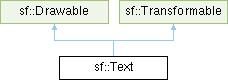
sf::Text is a drawable class that allows to easily display some text with custom style and color on a render target.
It inherits all the functions from sf::Transformable: position, rotation, scale, origin. It also adds text-specific properties such as the font to use, the character size, the font style (bold, italic, underlined and strike through), the text color, the outline thickness, the outline color, the character spacing, the line spacing and the text to display of course. It also provides convenience functions to calculate the graphical size of the text, or to get the global position of a given character.
sf::Text works in combination with the sf::Font class, which loads and provides the glyphs (visual characters) of a given font.
The separation of sf::Font and sf::Text allows more flexibility and better performances: indeed a sf::Font is a heavy resource, and any operation on it is slow (often too slow for real-time applications). On the other side, a sf::Text is a lightweight object which can combine the glyphs data and metrics of a sf::Font to display any text on a render target.
It is important to note that the sf::Text instance doesn't copy the font that it uses, it only keeps a reference to it. Thus, a sf::Font must not be destructed while it is used by a sf::Text (i.e. never write a function that uses a local sf::Font instance for creating a text).
See also the note on coordinates and undistorted rendering in sf::Transformable.
Usage example:
- See also
- sf::Font, sf::Transformable
Member Typedef Documentation
◆ GlyphPreProcessor
Callable that is provided with glyph data for pre-processing.
When re-generating the text geometry, shaping will be performed on the input string using the set font. The result of shaping is a set of shaped glyphs. Shaped glyphs are glyphs that have been positioned by the shaper and whose script direction has also been determined.
Because multiple input codepoints can be merged into a single glyph and single codepoints decomposed into multiple glyphs, the shaper provides a way to map the shaping output back to the input. When the input string is provided to the shaper, a monotonically increasing character index is attached to each input codepoint. If the input string consists of 10 codepoints, the indices will be 0 to 9.
After shaping each shaped glyph will be assigned a cluster value. These cluster values are derived from the input indices that were provided to the shaper. Because of the merging and decomposing that happens during shaping, there isn't a 1 to 1 mapping between input indices and output cluster values.
In order to set the glyph properties reliably, they have to be set based on text segmentation boundaries such as graphemes, words and sentences. See the corresponding methods in sf::String that can check for these boundaries.
Once the input text segments to be pre-processed have been determined, they have to be applied to the shaped glyphs. When using character or grapheme cluster grouping it is guaranteed that the resulting cluster values are monotonic. This means that cluster values will not be reordered beyond the bounds of the indices that were provided with the input text.
What this means is that given a segment of text that should e.g. be colored differently, if a beginning and end index can be determined from the input codepoints, these index boundaries can be used to select the clusters of the shaped glyphs that correspond to the input segment and thus whose color needs to be set.
Here is an example string with codepoint indices:
After shaping, due to ligature merging of fl, ffi and ffl, the output clusters might look like:
In order to e.g. color the word "muffins", the beginning and end codepoint indices of the word have to be determined, in this case 16 and 22. After shaping, any glyphs belonging to the word "muffins" will have cluster values between and including 16 and 22. In the example above the clusters 16, 17, 18, 21 and 22 belong to the word "muffins". Coloring the glyphs with those indices will result in the word "muffins" being colored.
The same applies to "flowers" and "waffles" in the example above.
Because merging and decomposition of codepoints cannot happen beyond word boundaries, applying properties to glyphs using the above method is safe when segmenting based on words. As can be seen above it would not work when attempting to apply a different property to the single graphemes 'f', 'l' or 'i' since they can be merged with neighbouring graphemes into a single glyph.
The opposite, decomposition, of the following input:
into glyphs would look like:
The + at cluster 12 is a placeholder for the acute accent. This can occur if the font provides the glyph for the accent seperate from the base glyph e which also has the cluster value 12. The codepoint é is thus decomposed into a base glyph and a mark glyph. The cluster value of the mark in such a decomposition will be identical to the base. Because of this, the same procedure as demonstrated in the fist example can be applied here as well.
The above examples are just simple examples of how to map input codepoint indices to output cluster values. While merging and decomposition are an exception in latin script, they can occur very frequently in other scripts. The mapping procedure described above will work for all scripts.
Once the boundaries of the cluster values whose properties to modify have been determined, they can be used from within the callable to set said properties on a glyph by glyph basis.
The callable will be called in the order in which glyph geometry is generated. This does not always happen in ascending cluster order such as in right-to-left text where it happens in descending cluster order.
Be aware that while changing the character size per glyph is not possible, changing its style or outline thickness is. Doing this, however, might lead to slight inconsistencies when the text bounds are computed at the end of the geometry update process. The same applies to the italic style.
In contrast, changing the fill or outline color is safe since they don't have any effect on the pixel coverage of the glyph.
Setting the underlined and strikethrough styles per glyph is technically possible but not yet implemented.
Note: Because text bounds are computed based on the geometry, it is not safe or reliable to query the text bounds from within this callable. If it is absolutely necessary to make decisions within this callable based on text bounds, multiple geometry updates will be necessary. The first geometry update is run with the pre-processor set to pass through data. Based on the first update the text bounds can be queried and stored. The stored text bounds can then be used in the second geometry update.
Member Enumeration Documentation
◆ ClusterGrouping
|
strong |
◆ LineAlignment
|
strong |
Enumeration of the text alignment options.
◆ Style
| enum sf::Text::Style |
◆ TextDirection
|
strong |
◆ TextOrientation
|
strong |
Constructor & Destructor Documentation
◆ Text() [1/2]
Construct the text from a string, font and size.
Note that if the used font is a bitmap font, it is not scalable, thus not all requested sizes will be available to use. This needs to be taken into consideration when setting the character size. If you need to display text of a certain size, make sure the corresponding bitmap font that supports that size is used.
◆ Text() [2/2]
Disallow construction from a temporary font.
Member Function Documentation
◆ findCharacterPos()
|
nodiscard |
Return the position of the index-th character.
- Deprecated
- Use getShapedGlyphs() instead.
This function computes the visual position of a character from its index in the string. The returned position is in global coordinates (translation, rotation, scale and origin are applied). If index is out of range, the position of the end of the string is returned.
- Parameters
-
index Index of the character
- Returns
- Position of the character
◆ getCharacterSize()
|
nodiscard |
◆ getClusterGrouping()
|
nodiscard |
Return the cluster grouping algorithm in use.
- Returns
- The cluster grouping algorithm in use
◆ getFillColor()
|
nodiscard |
◆ getFont()
|
nodiscard |
Get the text's font.
The returned reference is const, which means that you cannot modify the font when you get it from this function.
- Returns
- Reference to the text's font
- See also
- setFont
◆ getGlobalBounds()
|
nodiscard |
Get the global bounding rectangle of the entity.
The returned rectangle is in global coordinates, which means that it takes into account the transformations (translation, rotation, scale, ...) that are applied to the entity. In other words, this function returns the bounds of the text in the global 2D world's coordinate system.
- Returns
- Global bounding rectangle of the entity
◆ getInverseTransform()
|
nodiscardinherited |
get the inverse of the combined transform of the object
- Returns
- Inverse of the combined transformations applied to the object
- See also
- getTransform
◆ getLetterSpacing()
|
nodiscard |
Get the size of the letter spacing factor.
- Returns
- Size of the letter spacing factor
- See also
- setLetterSpacing
◆ getLineAlignment()
| LineAlignment sf::Text::getLineAlignment | ( | ) | const |
◆ getLineSpacing()
|
nodiscard |
Get the size of the line spacing factor.
- Returns
- Size of the line spacing factor
- See also
- setLineSpacing
◆ getLocalBounds()
|
nodiscard |
Get the local bounding rectangle of the entity.
The returned rectangle is in local coordinates, which means that it ignores the transformations (translation, rotation, scale, ...) that are applied to the entity. In other words, this function returns the bounds of the entity in the entity's coordinate system.
- Returns
- Local bounding rectangle of the entity
◆ getOrigin()
|
nodiscardinherited |
◆ getOutlineColor()
|
nodiscard |
◆ getOutlineThickness()
|
nodiscard |
Get the outline thickness of the text.
- Returns
- Outline thickness of the text, in pixels
- See also
- setOutlineThickness
◆ getOutlineVertexData()
| VertexArray & sf::Text::getOutlineVertexData | ( | ) | const |
Get a reference to the outline vertex data of this text.
The outline vertex data is regenerated by the text whenever it is necessary. Any changes made to the outline vertex data will be discarded whenever this happens.
- Returns
- Reference to the vertex data of this text
◆ getPosition()
|
nodiscardinherited |
◆ getRotation()
|
nodiscardinherited |
get the orientation of the object
The rotation is always in the range [0, 360].
- Returns
- Current rotation
- See also
- setRotation
◆ getScale()
|
nodiscardinherited |
◆ getShapedGlyphs()
|
nodiscard |
Return a list of shaped glyphs that make up the text.
The result of shaping i.e. positioning individual glyphs based on the properties of the font and the input text is a sequence of shaped glyphs that each have a collection of properties.
In addition to the glyph information that is available by looking up a glyph from a font, the glyph position, glyph cluster ID and direction of the text represented by the glyph is provided.
When specifying unicode text, multiple unicode codepoints might combine to form e.g. a ligature such as æ or base-and-mark sequence such as é which are composed of multiple individual glyphs. These combinations are known as grapheme clusters. When segmenting text into grapheme clusters, each cluster identifies a complete unit of text that will be drawn. There are other methods of segmenting text into clusters e.g. without combining marks. Character cluster segmentation is used as the default. A single grapheme can be represented by an individual codepoint or by a composition of codepoints e.g. an e as the base and an accent as the mark which together compose the grapheme é. The cluster groups that result from shaping depend on whether the input text provides composed codepoints or decomposed codepoints. This is an advanced topic known as unicode normalisation.
When positioning e.g. a cursor within the text, grapheme clusters can be treated as the basic units of which the text is composed and not subdivided into their individual components or glyphs. If positioning of the cursor within a single grapheme e.g. a ligature is required, a more fine-grained cluster segmentation algorithm should be used.
The returned glyph positions are in local coordinates (translation, rotation, scale and origin are not applied).
- Returns
- List of shaped glyphs that make up the text
- See also
- setClusterGrouping
◆ getString()
|
nodiscard |
Get the text's string.
The returned string is a sf::String, which can automatically be converted to standard string types. So, the following lines of code are all valid:
- Returns
- Text's string
- See also
- setString
◆ getStyle()
|
nodiscard |
◆ getTextOrientation()
| TextOrientation sf::Text::getTextOrientation | ( | ) | const |
◆ getTransform()
|
nodiscardinherited |
get the combined transform of the object
- Returns
- Transform combining the position/rotation/scale/origin of the object
- See also
- getInverseTransform
◆ getVertexData()
| VertexArray & sf::Text::getVertexData | ( | ) | const |
Get a reference to the vertex data of this text.
The vertex data is regenerated by the text whenever it is necessary. Any changes made to the vertex data will be discarded whenever this happens.
- Returns
- Reference to the vertex data of this text
◆ move()
|
inherited |
Move the object by a given offset.
This function adds to the current position of the object, unlike setPosition which overwrites it. Thus, it is equivalent to the following code:
- Parameters
-
offset Offset
- See also
- setPosition
◆ rotate()
|
inherited |
Rotate the object.
This function adds to the current rotation of the object, unlike setRotation which overwrites it. Thus, it is equivalent to the following code:
- Parameters
-
angle Angle of rotation
◆ scale()
|
inherited |
◆ setCharacterSize()
| void sf::Text::setCharacterSize | ( | unsigned int | size | ) |
Set the character size.
The default size is 30.
Note that if the used font is a bitmap font, it is not scalable, thus not all requested sizes will be available to use. This needs to be taken into consideration when setting the character size. If you need to display text of a certain size, make sure the corresponding bitmap font that supports that size is used.
- Parameters
-
size New character size, in pixels
- See also
- getCharacterSize
◆ setClusterGrouping()
| void sf::Text::setClusterGrouping | ( | ClusterGrouping | clusterGrouping | ) |
Set the cluster grouping algorithm to use.
By default, character cluster grouping is used.
Character cluster grouping is good enough to be able to position cursors in most scenarios. If more coarse-grained grouping is required, grapheme grouping can be selected.
Cluster grouping can also be disabled if necessary.
- Parameters
-
clusterGrouping The cluster grouping algorithm to use
◆ setFillColor()
| void sf::Text::setFillColor | ( | Color | color | ) |
Set the fill color of the text.
By default, the text's fill color is opaque white. Setting the fill color to a transparent color with an outline will cause the outline to be displayed in the fill area of the text.
- Parameters
-
color New fill color of the text
- See also
- getFillColor
◆ setFont() [1/2]
|
delete |
Disallow setting from a temporary font.
◆ setFont() [2/2]
| void sf::Text::setFont | ( | const Font & | font | ) |
Set the text's font.
The font argument refers to a font that must exist as long as the text uses it. Indeed, the text doesn't store its own copy of the font, but rather keeps a pointer to the one that you passed to this function. If the font is destroyed and the text tries to use it, the behavior is undefined.
- Parameters
-
font New font
- See also
- getFont
◆ setGlyphPreProcessor()
| void sf::Text::setGlyphPreProcessor | ( | GlyphPreProcessor | glyphPreProcessor | ) |
Set the glyph pre-processor to be called per glyph.
The glyph pre-processor is a callable that will be called with glyph data to be pre-processed.
- Parameters
-
glyphPreProcessor The glyph pre-processor to be called per glyph, pass an empty pre-processor to disable pre-processing
◆ setLetterSpacing()
| void sf::Text::setLetterSpacing | ( | float | spacingFactor | ) |
Set the letter spacing factor.
The default spacing between letters is defined by the font. This factor doesn't directly apply to the existing spacing between each character, it rather adds a fixed space between them which is calculated from the font metrics and the character size. Note that factors below 1 (including negative numbers) bring characters closer to each other. By default the letter spacing factor is 1.
- Parameters
-
spacingFactor New letter spacing factor
- See also
- getLetterSpacing
◆ setLineAlignment()
| void sf::Text::setLineAlignment | ( | LineAlignment | lineAlignment | ) |
Set the line alignment for a multi-line text.
By default, the lines will be aligned according to the direction of the line's script. Left-to-right scripts will be aligned to the left and right-to-left scripts will be aligned to the right.
Forcing alignment will ignore script direction and always align according to the requested line alignment.
- Parameters
-
lineAlignment New line alignment
- See also
- getLineAlignment
◆ setLineSpacing()
| void sf::Text::setLineSpacing | ( | float | spacingFactor | ) |
Set the line spacing factor.
The default spacing between lines is defined by the font. This method enables you to set a factor for the spacing between lines. By default the line spacing factor is 1.
- Parameters
-
spacingFactor New line spacing factor
- See also
- getLineSpacing
◆ setOrigin()
|
inherited |
set the local origin of the object
The origin of an object defines the center point for all transformations (position, scale, rotation). The coordinates of this point must be relative to the top-left corner of the object, and ignore all transformations (position, scale, rotation). The default origin of a transformable object is (0, 0).
- Parameters
-
origin New origin
- See also
- getOrigin
◆ setOutlineColor()
| void sf::Text::setOutlineColor | ( | Color | color | ) |
Set the outline color of the text.
By default, the text's outline color is opaque black.
- Parameters
-
color New outline color of the text
- See also
- getOutlineColor
◆ setOutlineThickness()
| void sf::Text::setOutlineThickness | ( | float | thickness | ) |
Set the thickness of the text's outline.
By default, the outline thickness is 0.
Be aware that using a negative value for the outline thickness will cause distorted rendering.
- Parameters
-
thickness New outline thickness, in pixels
- See also
- getOutlineThickness
◆ setPosition()
|
inherited |
set the position of the object
This function completely overwrites the previous position. See the move function to apply an offset based on the previous position instead. The default position of a transformable object is (0, 0).
Note that sf::Text may appear offset when positioned. This is because its local bounds are influenced by font metrics (e.g. tallest characters) to consistently align with the text's baseline. As such the getGlobalBounds() position may not match the position you set.
To account for this offset, the local bounds need to be considered. Either by including it in the position calculation:
Or by adjusting the text's origin:
- Parameters
-
position New position
- See also
- move, getPosition
◆ setRotation()
|
inherited |
set the orientation of the object
This function completely overwrites the previous rotation. See the rotate function to add an angle based on the previous rotation instead. The default rotation of a transformable object is 0.
- Parameters
-
angle New rotation
- See also
- rotate, getRotation
◆ setScale()
|
inherited |
◆ setString()
| void sf::Text::setString | ( | const String & | string | ) |
Set the text's string.
The string argument is a sf::String, which can automatically be constructed from standard string types. So, the following calls are all valid:
A text's string is empty by default.
- Parameters
-
string New string
- See also
- getString
◆ setStyle()
| void sf::Text::setStyle | ( | std::uint32_t | style | ) |
Set the text's style.
You can pass a combination of one or more styles, for example sf::Text::Bold | sf::Text::Italic. The default style is sf::Text::Regular.
- Parameters
-
style New style
- See also
- getStyle
◆ setTextOrientation()
| void sf::Text::setTextOrientation | ( | TextOrientation | textOrientation | ) |
Set the text orientation.
By default, the lines will have horizontal orientation.
Be aware that most fonts don't natively support vertical orientations. Fonts that are the most likely to natively support vertical orientations are those whose scripts also support vertical orientations e.g. east asian scripts.
If a font does not natively support vertical orientation, vertical metrics might still be provided for shaping. In this case, they are very likely to be emulated and might not result in good visual output.
Some metrics such as advance and baseline position will be rotated so they match the vertical axis.
- Parameters
-
textOrientation New text orientation
- See also
- getTextOrientation
The documentation for this class was generated from the following file: